Currency
|

As low as £44.08 £36.73
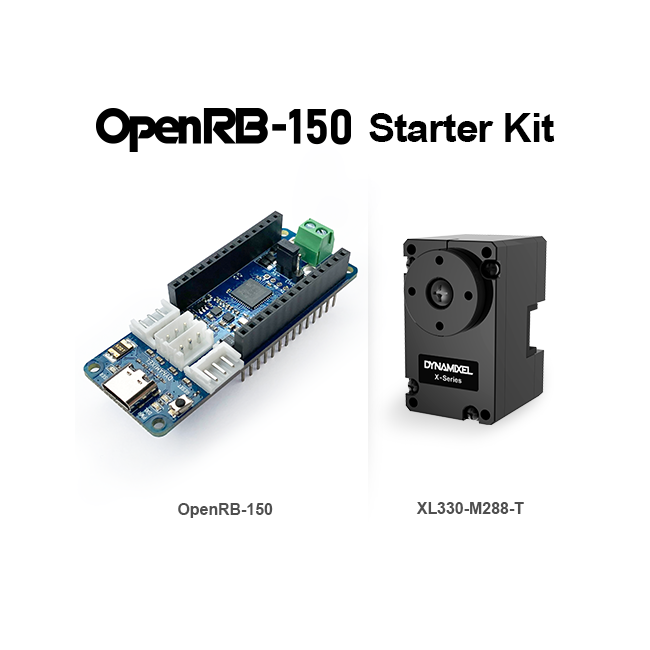
* OpenRB-150 Tutorial Kit is a product consisting of OpenRB-150 and XL330-M288-T.
* Product Name Change on May 20, 2025 (Previous Name: OpenRB-150 Starter Kit)
* Batteries, USB Cables, and Power Cables are not included.
OpenRB-150
Has the same pinout and form factor as the Arduino MKR, and supports programming using the Arduino IDE.
XL330-M288-T
Compact and lightweight DYNAMIXEL.
Supports RC protocol & 6 control modes including Current Control and Current Based Position Control.
| Product Name | Quantity | Product Description |
|---|---|---|
| OpenRB-150 | 1 | DYNAMIXEL Controller |
| XL330-M288-T | 1 | DYNAMIXEL |
| Robot Cable-X3P 180mm | 1 | TTL 3P cable (JST-JST) |
| PHS M2x6 TAP | 6 | Bolts for Horn |
| PHS M2x8 TAP | 10 | Bolts for Frame Assembly |
OpenRB-150
| MCU | SAMD21 Cortex-M0+ 32bit low power ARM® |
|---|---|
| Operation Voltage | 5.0V (USB 3.0) 3.7V ~ 12.6V (VIN or Terminal) |
| Operation Temperature | -40℃ ~ 85℃ |
| Allowable Current | 3.0A (DYNAMIXEL Port) |
| Connector Type | USB C-Type, Terminal Block |
| Dynamixel Port(TTL) | JST B3B-EH-A(2), JST S3B-EH-A(2) [Max 1Mbps] |
| Dimentions | 66 x 25 mm |
| Weight | 13g |
XL330-M288-T
| MCU | Cortex-M0+ (64 [MHz], 32bit) | |
|---|---|---|
| Input Voltage | Min. [V] | 3.7 |
| Recommended [V] | 5.0 | |
| Max. [V] | 6.0 | |
| Performance Characteristics | Voltage [V] | 5.0 |
| Stall Torque [N·m] | 0.52 | |
| Stall Current [A] | 1.5 | |
| No Load Speed [rpm] | 104.0 | |
| No Load Current [A] | 0.15 | |
| Continuous Operation | Voltage [V] | - |
| Torque [N·m] | - | |
| Speed [rpm] | - | |
| Current [A] | - | |
| Resolution | Resolution [deg/pulse] | 0.0879 |
| Step [pulse/rev] | 4 | |
| Angle [degree] | 360 | |
| Position Sensor | Contactless absolute encoder (12Bit, 360 [deg]) Maker : ams(www.ams.com), Part No : AS5601 | |
| Operating Temperature | Min. [°C] | -5 |
| Max. [°C] | 60 | |
| Motor | Cored | |
| Baud Rate | Min. [bps] | 9,600 |
| Max. [bps] | 4,000,000 | |
| Control Algorithm | PID | |
| Gear Type | Spur | |
| Gear Material | Engineering Plastic | |
| Case Material | Engineering Plastic | |
| Dimensions (WⅹHⅹD) [mm] | 20 X 34 X 26 | |
| Dimensions (WⅹHⅹD) [inch] | 0.78 X 1.33 X 1.02 | |
| Weight [g] | 18.00 | |
| Weight [oz] | 0.63 | |
| Gear Ratio | 288.4 : 1 | |
| Command Signal | Digital Packet | |
| Protocol Type | Half duplex Asynchronous Serial Communication (8bit, 1stop, No Parity) | |
| Link (Physical) | TTL Level Multi Drop Bus | |
| ID | 0 ~ 252 | |
| Feedback | Position, Velocity, Current, Realtime tick, Trajectory, Temperature, Input Voltage, etc | |
| Protocol Type | Protocol 2.0 Experimental S.BUS Experimental iBUS RC-PWM | |
| Operating Mode / Angle | Current Control mode:Endless turn Velocity Control mode:Endless turn Position Control Mode:360 [deg Extended Position Control Mode:±256 [rev] Current-based Position Control Mode:±256 [rev] PWM Control Mode:Endless turn | |
| Output [W] | - | |
| Standby Current [mA] | 15 | |
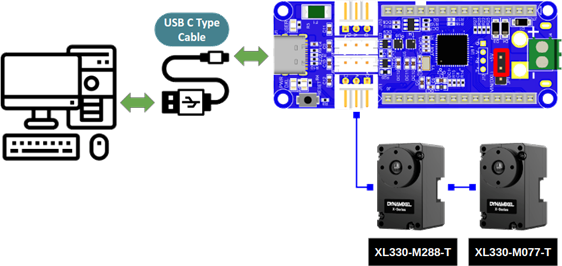
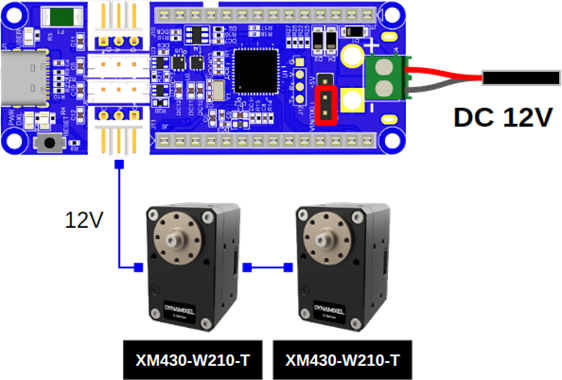
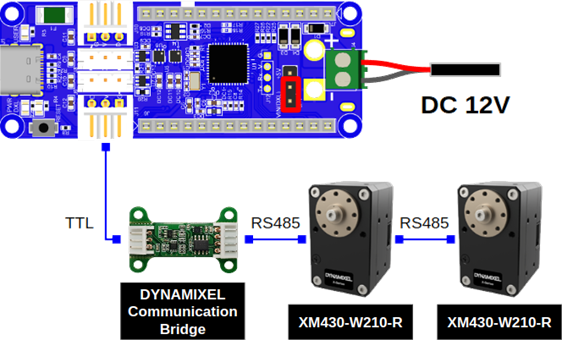
Power can be supplied to the OpenRB-150 in three ways depending on the voltage and serial communication type of DYNAMIXEL.
1. 5V TTL DYNAMIXEL
2. 12V TTL DYNAMIXEL
3. 12V RS-485 DYNAMIXEL
The OpenRB-150 is compatible with all DYNAMIXEL models.
However, additional equipment is required for use with the following types of DYNAMIXEL.
1. RS-485
The DYNAMIXEL Communication Bridge is required to convert signals.
2. 24V
A separate power supply is required.
3. DYNAMIXEL-AX and MX Series (Molex connectors)
A Molex-JST convertible cable is required.
1. The Arduino MKR board is not included in the package.
2. When supplying power, please check the jumper settings. (USB C Type, VIN, Terminal VIN)
3. Please do not charge the battery when it is connected to the controller.
4. Please check the power input terminal before connecting it to the controller.
| Manufacturer | Robotis |
|---|